SFM Compile Club: A Beginner’s Guide to Source Filmmaker Compilation and Community

Introduction
If you’ve ever dropped a custom model into Source Filmmaker and watched it turn into a purple-and-black checkerboard, you’ve already met the problem the SFM Compile Club exists to solve. The term gets thrown around a lot online, but it rarely gets explained clearly.
This guide cuts through the confusion. You’ll learn what the “club” actually refers to, the two very different things people mean by “compile,” and how to get your models and renders working without losing your mind.
What Is the SFM Compile Club, Exactly?
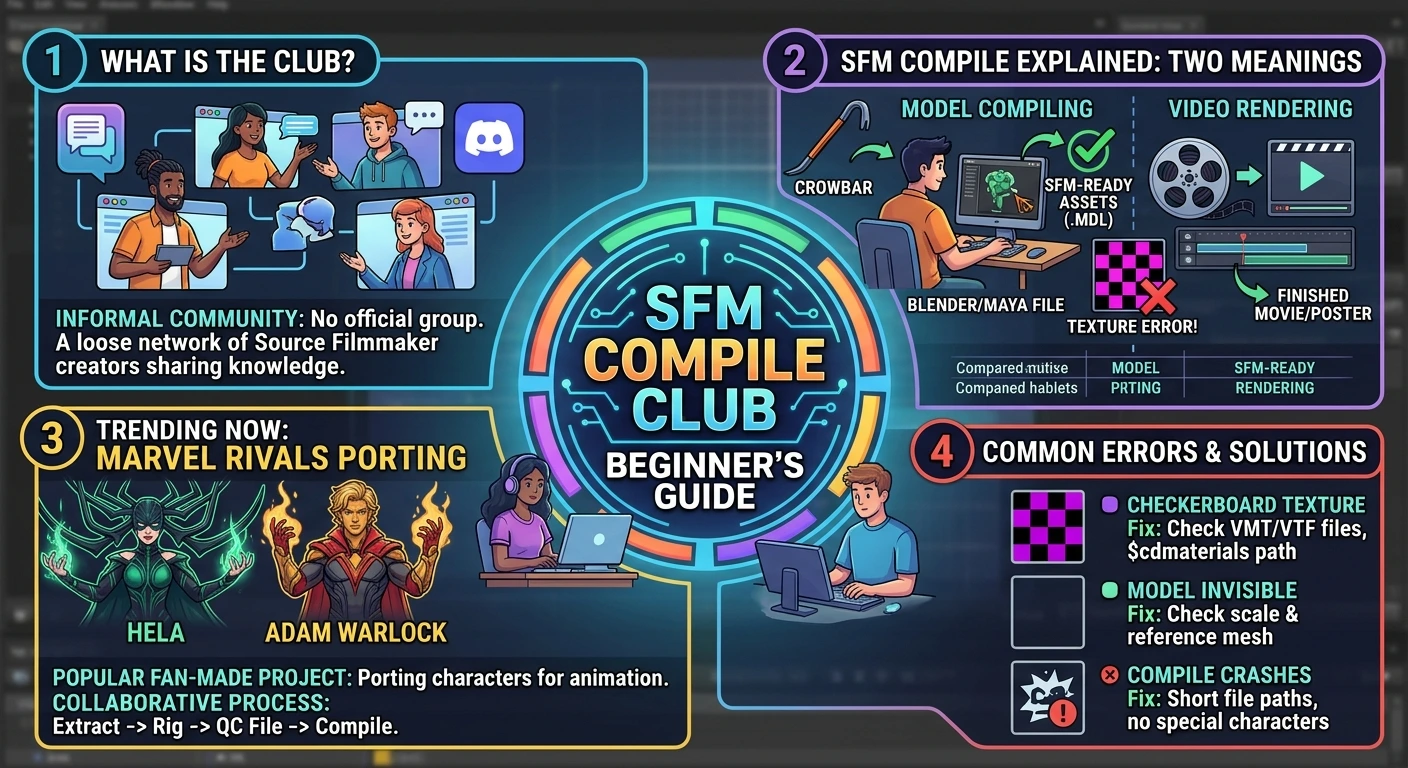
Search for the phrase and you’ll find a messy mix of blogs, Discord servers, and sites with very different rules. That’s because there’s no official “club” with a membership card. The name is a doorway into the wider world of Source Filmmaker creators.
At its core, the SFM Compile Club is the collective knowledge of people who use Valve’s free animation tool. They share QC file templates, troubleshoot texture errors, and post their finished work. You’ll find them on forums, in Steam Workshop comments, and on dedicated Discord servers.
Some spaces are heavily moderated and beginner-friendly. Others are chaotic, inactive, or focused on mature content. The name tells you what a place calls itself. It doesn’t tell you whether it’s useful or safe.
SFM Compile Explained: Two Meanings, One Confusing Term
Before you join any community, you need to understand the vocabulary. The word “compile” gets used in two completely different ways, and mixing them up is the fastest way to get confused.
Definition: In Source Filmmaker, “compile” can mean either (1) rendering a finished project into a video or image sequence, or (2) converting raw 3D model files into the binary format the Source engine can load.
The rendering meaning is straightforward. You pose your characters, set your lights, and export a movie or poster. The model-compiling meaning is the technical one. It’s the process that turns a Blender or Maya file into an .mdl file with accompanying .vvd, .vtx, and .phy files. Without it, SFM has nothing to display.
Here’s a quick comparison to keep them straight:
| What you’re doing | What “compile” means | Main tool | Output |
|---|---|---|---|
| Finishing a video | Rendering the timeline | SFM’s built-in exporter | Movie, poster, or image sequence |
| Adding a custom model | Building a Source-engine asset | Crowbar or studiomdl | .mdl and companion files |
Most beginner frustration comes from the second type. A model that hasn’t been compiled simply won’t work, no matter how many times you drag it into the viewport.
How the Compilation Process Actually Works
The model-compiling workflow follows a predictable path. Once you understand the steps, it stops feeling like a black box. Valve’s official documentation on exporting assets describes the process as creating models from source assets, and the community has built tools to make it easier.
Here’s the basic pipeline:
- Build or download the model. You start in a modeling program like Blender. You need the mesh, a skeleton (rig), and textures.
- Export to SMD or DMX. The Source engine can’t read
.blendor.maxfiles. You export to SMD (Studiomdl Data) or DMX. - Write a QC file. This plain-text script tells the compiler where to find your geometry, textures, and physics mesh. A single typo in a file path can break the whole compile.
- Run the compiler. You can use Valve’s command-line
studiomdl.exeor a visual tool like Crowbar. - Test in SFM. Open the model library and drop your new asset into a scene. Check for texture errors and bone issues.
For step four, most beginners prefer Crowbar. It wraps the command-line compiler in a clean interface and shows errors in plain text. The terminal route works fine, but it’s less forgiving when you’re learning.
The QC file is where most compiles fail. Community guides point to mistyped file paths, missing $cdmaterials lines, and bone hierarchies that don’t match Source’s naming conventions as the usual suspects. If you’re stuck, paste your QC file into a community forum and ask for a second pair of eyes. That’s exactly what the “club” is for.
Why Marvel Rivals Models Are Everywhere in SFM Right Now
The Marvel Rivals SFM compile trend is one of the clearest examples of how a new game can energize a modding community. When NetEase’s hero shooter launched, it didn’t take long for creators to extract character models and start porting them into Source Filmmaker.
You can already find Hela, Adam Warlock, and other Marvel Rivals characters available as SFM-ready assets on workshop download sites. The demand is simple: fans want to see these characters in fan-made animations, and SFM is the most accessible tool for the job.
But porting a model from a modern game isn’t a one-click process. The original files often need cleanup, re-rigging, and texture adjustments before they’ll compile cleanly for the Source engine. That’s why Marvel Rivals ports have become a popular shared project in SFM communities. Someone extracts the model, someone else fixes the skeleton, and a third person writes the QC file. It’s collaborative by necessity.
If you want to try a Marvel Rivals SFM compile yourself, start with a character that already has a community-made QC file. You can learn the workflow without building everything from scratch. Marvel Rivals’ official website and community hubs are good places to see which characters are currently popular.
Common SFM Compile Club Errors and How to Fix Them
Every SFM creator hits the same handful of errors. Knowing what they mean saves hours of frustration.
The purple-and-black checkerboard. This is the classic. It means the model’s texture couldn’t be found or loaded. Check your VMT and VTF files, and make sure the $cdmaterials path in your QC points to the right folder.
“Model has no sequences” error. This usually means your QC file is missing a $sequence line, or the SMD file doesn’t contain animation data. If you’re porting a static model, you still need to define a default sequence.
Compile crashes with no error message. Long file paths, special characters in folder names, and missing dependencies can all cause silent failures. Move your project to a short path like C:\sfm_work\ and try again.
The model loads but is invisible. This often points to a scale issue or a problem with the reference mesh. Try scaling the model up in Blender before exporting, or check that your $scale directive in the QC is correct.
The fastest way to solve these problems is to ask a specific question. “Why is my model a checkerboard?” is better than “SFM compile not working.” Include a screenshot, your QC file, and the exact error text. Communities respond much faster when you’ve done that homework.
How to Find a Trustworthy SFM Community
Not every space that uses the “SFM Compile Club” name is worth your time. Some are well-moderated and helpful. Others are abandoned, chaotic, or focused on content you might not want on your screen at work.
Here’s a simple checklist for vetting a community:
- Is there active moderation? Look for recent posts and visible moderators. A dead forum won’t answer your questions.
- Are beginners welcome? Read a few threads. If simple questions get mocked, move on.
- Is the focus on learning? Good communities have pinned guides, QC templates, and troubleshooting checklists.
- Does it respect creators? Credit and permission matter in the SFM world. A community that ignores that isn’t one you want to rely on.
Steam Workshop comments and dedicated Discord servers are often more active than standalone websites. Start there, lurk for a week, and see how people treat each other before you invest time in posting your own work.
Your First Project: A Simple Roadmap
You don’t need to master everything at once. A slow, focused start beats a frantic weekend of failed compiles.
Week 1: Look around. Install SFM, browse the Workshop, and read a few beginner threads. Don’t download fifty models. Just get comfortable with the interface.
Week 2: Pick one skill. Choose lighting, posing, or camera work. Practice it on a ten-second scene. Keep the best frame and delete the rest.
Week 3: Ask a smaller question. Instead of “How do I get better at SFM?” try “Why is my render grainy in dark scenes?” Specific questions get specific answers.
Week 4: Share something small. Post a short clip or a still frame. Give credit for every asset you used. Ask for one piece of feedback. Finishing a small project teaches you more than starting a big one.
FAQ
What is the SFM Compile Club?
It’s an informal name for the network of Source Filmmaker users who share compilation advice, troubleshoot errors, and trade assets. There’s no official membership or single website.
What does “SFM compile” actually mean?
It depends on context. For videos, it means rendering your project into a shareable file. For models, it means converting raw 3D files into the .mdl format that the Source engine can load.
Why is my model a purple and black checkerboard in SFM?
That’s the engine’s missing-texture placeholder. Your model wasn’t compiled correctly, or the texture paths in your QC file are broken. Check your VMT and VTF files first.
How do I compile a Marvel Rivals model for SFM?
You need the extracted model files, a QC script, and a compiler like Crowbar. Most creators start with a community-made QC template rather than writing one from scratch.
Is the SFM Compile Club safe to join?
It depends on the specific space. Look for active moderation, recent posts, and a beginner-friendly tone. Avoid sites that push mature content without warning or require sketchy downloads.
Do I need to know programming to compile models for SFM?
No. Writing a QC file is more like editing a configuration file than writing code. If you can follow a template and edit file paths, you can learn the workflow.
Conclusion
The SFM Compile Club isn’t a secret society or a single website. It’s a shared problem-solving culture built around a free tool that’s been powering fan animations for over a decade. Whether you’re trying to fix a checkerboard model or port a Marvel Rivals character into your first scene, the help is out there.
Start small, ask specific questions, and don’t skip the QC file. The first clean compile feels like a small miracle. The second one feels like a skill.